Centralized Asset Registry
Manage every piece of equipment, vehicle and facility component in one hub, with technical specs, documents, purchase records and current condition data.
Task360 brings asset records together with location, condition, maintenance history, warranty information and related cost data on a single platform. Teams make more accurate decisions, maintenance processes move forward more clearly, and every asset has one trusted source of truth.
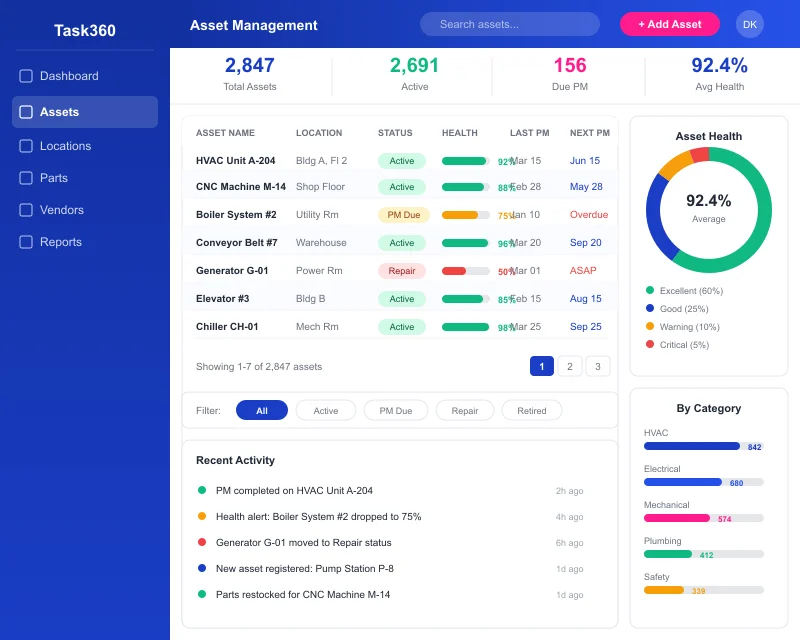
Without a centralized asset registry, teams overspend on maintenance, miss warranty opportunities, and make replacement decisions without solid data. A strong asset management foundation brings every critical equipment detail into one place and improves the quality of every decision.
Manage every piece of equipment, vehicle and facility component in one hub, with technical specs, documents, purchase records and current condition data.
Track purchase dates, warranty coverage, service history and replacement windows in one place to plan with stronger context.
See every asset's past work orders, inspections, part replacements and related cost records on a single screen.
When asset information lives in spreadsheets, folders and personal memory, teams are forced to make decisions on incomplete data. Some equipment gets over-maintained, some gets neglected, warranty opportunities slip away, and investment decisions aren't backed by clear numbers.
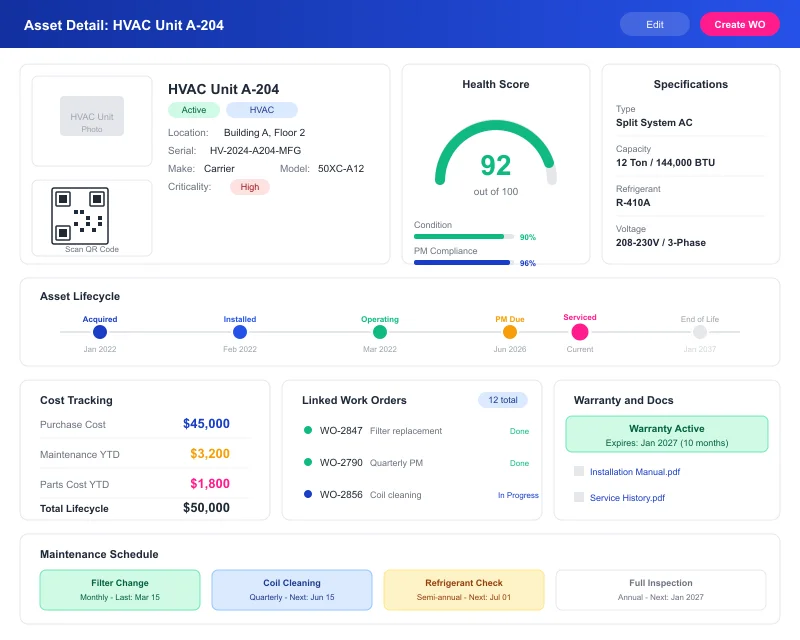
Task360 doesn't just list asset records, it turns them into a central management structure your teams can actually use day to day. You can define and tag assets, track their history, follow warranty and cost details, and link them directly to maintenance work.
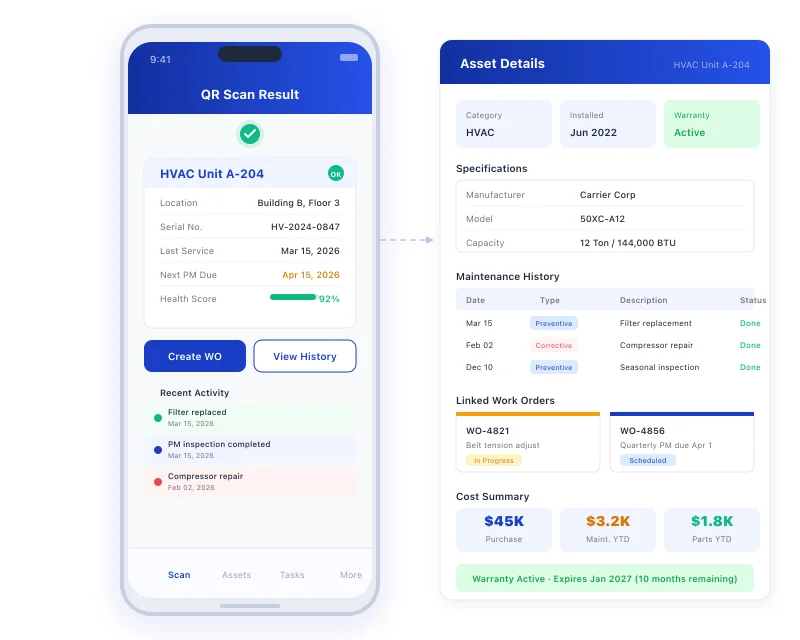
When asset data becomes organized and accessible, the impact shows up in more than just record quality, it shows up in daily operations. Cleaner tracking, healthier planning and stronger decision-making support team performance directly.
Consistent maintenance history and steadier tracking help teams keep equipment in healthier condition over time.
Visibility into past records, warranty information and current condition helps teams reduce avoidable spending.
One up-to-date record per asset means every team works from the same accurate information.
Asset management software lets teams track equipment, vehicles and other critical assets in one place. When asset details, maintenance history, location and related records sit on a single platform, teams can make faster and more accurate decisions.
Yes. For every asset, past work orders, maintenance records, inspections and related actions can be viewed in one place. That makes it easier for teams to spot recurring issues and build smarter maintenance plans.
Yes. Teams can access asset information from mobile devices, update records and capture data on site. Information stays current and work moves forward without waiting to return to the office.
Yes. With QR codes or barcodes, teams can quickly reach the right asset, view its history and start the next action in less time.
When asset history, maintenance records and current condition are visible, teams can spot issues earlier and plan maintenance more accurately. That helps reduce unexpected breakdowns and keeps equipment running more reliably.
See in a short demo how Task360 makes asset records, maintenance history and lifecycle tracking more organized, more visible and more manageable for your team.